
Stop losing metallography prep work in notebooks and shared drives.
Materials Prep is the ELN built for metallography labs. A single home for samples, prep recipes, micrographs, etchants, and the studies that tie them together.
Free to try. No credit card.
Built around how a metallography lab actually works.
Generic ELNs make you bend your workflow to fit their forms. This one starts from the sample and the prep, the way you already think about the work.
A prep journal for every sample
Mounting, grinding, polishing, and etching, recorded as it happens. Notes, photos, and recipe runs all live on the sample, not in a notebook on someone's bench.
Batches when the work repeats
When a lot of samples runs through the same prep together, group them into a batch. Log one step with one set of parameters and the entry fans out to every sample's journal. Each sample is still first-class for reports and atlas references.
Recipes your lab actually follows
Capture the prep recipes your lab has tuned over the years, organized by alloy, hardness, and mount type. Apply them to a sample in one tap, and every run is logged.
The etchants you use, on hand
A working catalog of etchants with composition, target alloys, and safety notes, so the technician at the bench can pick the right one without leaving the journal.
An atlas of your microstructures
Every micrograph you take is searchable by alloy, condition, and etchant. Build a reference your team can actually use, instead of folders of unlabeled images.
Studies that group the work
When a job spans dozens of samples for failure analysis, qualification, or R&D, group them into a study and compare prep, hardness, and microstructure side by side.
Meet M.AI — your prep assistant.
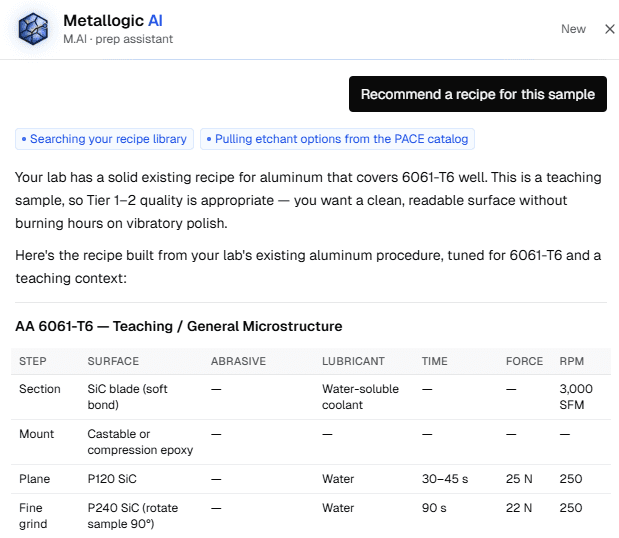
Mai sits inside every sample. Ask for a recipe, an etchant, or what a polishing artifact means. Built on the PACE Metallographic Handbook. Reads your sample, your inventory, and your recipe book before answering.
- Recipe recommendations matched to your inventory
- PACE etchant catalog (~2,700 entries) at the question
- Photo a defect, get a diagnosis and a corrected ladder
Common questions about a metallography ELN.
- What is a metallography ELN?
- An electronic lab notebook built around the way metallography labs actually work. Sample-first, with mounting, grinding, polishing, etching, and imaging captured as a single prep journal. Generic ELNs are designed for biotech experiments and don't have a place for any of that work.
- How is Materials Prep different from a generic ELN like Benchling or LabArchives?
- Generic ELNs treat every workflow as a form to fill out. Materials Prep starts from the sample and the prep. Recipes, etchants, micrographs, hardness readings, and studies are all first-class objects, so you don't bend metallography into a biotech-shaped tool.
- Who is Materials Prep for?
- Metallography labs of every shape: failure analysis labs (in-house or contract), university materials labs, and in-house QA / metallurgical labs. Projects carry customer name and PO number, so contract and service work files alongside in-house work in the same prep loop.
- Can I bring my lab's existing prep recipes and reference micrographs?
- Yes. Author recipes by alloy, hardness, and mount type, mark them as draft, under validation, or approved, and seed your micrograph atlas with the references your lab already trusts. Materials Prep ships empty, so your lab's recipes are the recipes.
- Does Materials Prep replace my microscope's imaging software?
- No. Microscope vendor software (OmniMet, Stream, ZEN, LAS X) keeps doing what it does. Materials Prep is where the sample, the prep, the recipe, and the resulting micrographs live as one record after the imaging is done.
- How is my lab's data secured?
- Data lives in Postgres with row-level security on every table. Your lab's samples, recipes, and images are scoped to your lab and your roles (admin, technician, viewer). Images are kept in private storage with signed URLs, never publicly served.
- What does Materials Prep cost?
- Free forever for a single solo lab, with the full prep journal, batches, recipes, etchants, and atlas included. Customer-facing reports (standard and certificate of conformance, in PDF and editable Word formats) are a paid feature starting at $89/month on the Lab tier, which also adds SSO and unlimited users. Multi-site plans go up from there. Metallogic AI is a $49/month add-on, available on every plan including Free.